
{kuzco} is a simple vision boilerplate built for ollama in R, on top of {ollamar} & {ellmer}. {kuzco} is designed as a computer vision assistant, giving local models guidance on classifying images and return structured data. The goal is to standardize outputs for image classification and use LLMs as an alternative option to keras or torch.
{kuzco} currently supports: classification, recognition, sentiment, text extraction, alt-text creation, and custom computer vision tasks.
Installation
You can install the development version of kuzco like so:
devtools::install_github("frankiethull/kuzco")kuzco 0.1.0 can be installed from CRAN via install.packages("kuzco")!
Example
This is a basic example which shows you how to use kuzco.
here we have an image and want to learn about it:
test_img <- file.path(system.file(package = "kuzco"), "img/test_img.jpg") 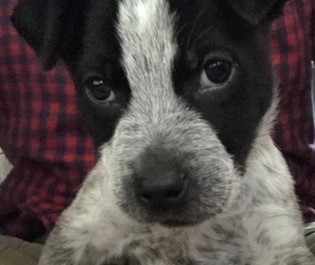
llm for image classification:
llm_results <- llm_image_classification(llm_model = "qwen2.5vl", image = test_img)
llm_results |> tibble::as_tibble()
#> # A tibble: 1 × 7
#>   image_classification primary_object secondary_object image_description
#>   <chr>                <chr>          <chr>            <chr>
#> 1 animal portrait      puppy          ""               A close-up portrait of a…
#> # ℹ 3 more variables: image_colors <chr>, image_proba_names <chr>,
#> #   image_proba_values <chr>
llm_results |> str()
#> tibble [1 × 7] (S3: tbl_df/tbl/data.frame)
#>  $ image_classification: chr "animal portrait"
#>  $ primary_object      : chr "puppy"
#>  $ secondary_object    : chr ""
#>  $ image_description   : chr "A close-up portrait of a fluffy, curious-looking puppy with a striking patch on its head. The puppy has a white"| __truncated__
#>  $ image_colors        : chr "The image has a palette with shades of white, black, and hints of gray."
#>  $ image_proba_names   : chr "puppy, fur texture, eye, coat"
#>  $ image_proba_values  : chr "[0.85, 0.10, 0.05, 0.05]"
llm for image sentiment:
llm_emotion <- llm_image_sentiment(llm_model = "qwen2.5vl", image = test_img)

llm_emotion |> str()
#> tibble [1 × 4] (S3: tbl_df/tbl/data.frame)
#>  $ image_sentiment      : chr "positive"
#>  $ image_score          : num 0.8
#>  $ sentiment_description: chr "The soft, warm lighting and the cute features of the puppy create a feeling of happiness and warmth."
#>  $ image_keywords       : chr "cute, friendly, playful, adorable, lovable"
llm for image recognition:
note that the backend of kuzco is flexible as well. This allows users to specify between ‘ollamar’, which suggests structured outputs, while ‘ellmer’ enforces structured outputs.
llm_detection <- llm_image_recognition(llm_model = "qwen2.5vl",
                                       image = test_img,
                                       recognize_object = "nose")

llm_detection |> str()
#> tibble [1 × 4] (S3: tbl_df/tbl/data.frame)
#>  $ object_recognized : chr "TRUE"
#>  $ object_count      : int 1
#>  $ object_description: chr "A black and white puppy nose, slightly pink inside with dark round nostrils."
#>  $ object_location   : chr "center"
llm for image text extraction:
kuzco is also useful for OCR tasks, extracting text from images is showcased below:
text_img <- file.path(system.file(package = "kuzco"), "img/text_img.jpg")

text_img |> view_image()
llm_extract_txt <- llm_image_extract_text(llm_model = "qwen2.5vl",
                                          image = text_img,
                                          backend  = "ellmer")

llm_extract_txt |> str()
#> tibble [1 × 2] (S3: tbl_df/tbl/data.frame)
#>  $ text            : chr "Picture of Odin\nas a puppy\ncirca Q4 2019"
#>  $ confidence_score: num 0.99
newer features
llm image customization:
a new feature in kuzco, is a fully customizable function. This allows users to further test computer vision techniques without leaving the kuzco boilerplate.
llm_customized <- llm_image_custom(llm_model = "qwen2.5vl",
                                   image = test_img,
                                   system_prompt = "you are a dog breed expert, you know all about dogs.
                                                    tell me the primary breed, secondary breed, and a brief description about both.",
                                   image_prompt  = "tell me what kind of dog is in the image?",
                                   example_df = data.frame(
                                     dog_breed_primary = "hound",
                                     dog_breed_secondary = "corgi",
                                     dog_breed_information = "information about the primary and secondary breed"
                                   ))

llm_customized |> str()
#> 'data.frame':    1 obs. of  3 variables:
#>  $ dog_breed_primary    : chr "terrier"
#>  $ dog_breed_secondary  : chr "spotted"
#>  $ dog_breed_information: chr "The primary breed is likely a terrier based on the facial features and compact size. The secondary breed is 'sp"| __truncated__
additional enhancements:
i/o helpers
kuzco now has view_image & view_llm_results functions within the package, making it easy to view images and display llm results. In addition to this, kuzco now features kuzco_app a fully functioning shiny application within the package. Making it even easier to do computer vision with LLMs in R.
cloud-based LLMs
kuzco now supports all LLM providers that are supported by ellmer! That’s correct, you can now send images to Perplexity, Claude, OpenAI, Gemini, the list goes on. This defaults to “ollama” to maintain the original workflows.
Cloud-hosted LLMs generally offer greater speed and more advanced capabilities, but require users to obtain an API key since inference is handled remotely. While some providers offer a free tier with usage limits, others do not. Keep in mind that using a cloud-hosted LLM comes with less privacy compared to running a model locally, but it enables access to powerful, cutting-edge models. To get started, users should set up their API key in their environment and select a provider-hosted model that supports image processing.
A mistral example below using pixtral-12b, which is still a pretty small model. But leverages mistral’s compute, instead of yours.
# via base R:
Sys.setenv(MISTRAL_API_KEY = "the_api_key_via_the_provider")
# or usethis:
usethis::edit_r_environ()
kuzco::llm_image_classification(provider = "mistral", llm_model = "pixtral-12b", image = test_img)